Proxy
How to use a proxy?
To use the proxy function we need a proxy list, which we can get from websites that offer free proxies or purchase a private proxy list.
Warning
Free proxies are usually used by many people, so most connections will be too weak to play metin, you need to spend some time finding a good proxy if you use free ones. Free proxies die very quickly, which means the ones that worked yesterday may not work the next day
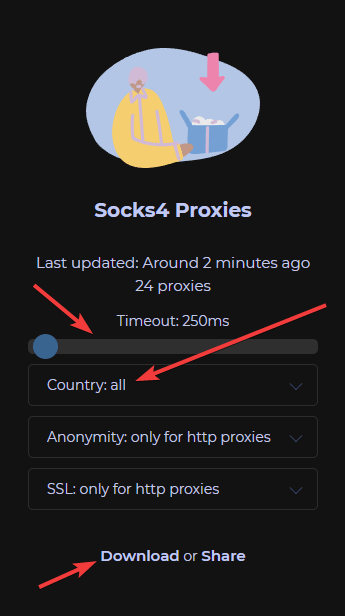
- Download proxy list from source for example we will use this source but we recommend you to find your own source). Select:
- Country we want proxies from
- Max ping
- Click the "Download" button
- Place downloaded file into hlbot/data/proxy, you can rename the file if you want to.
- Launch the HLBot on any server and click the proxy function. A window will open where we place the proxy which looks like this:
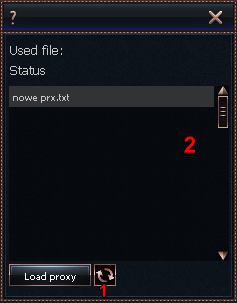
1. Refreshes the list of files in the proxy folder
2. List of files in the folder - After selecting proxy file, click "Load proxy", the following message will pop up:

- If this message pops up:
 It means we have successfully connected to the proxy and we can log in.
If this message pops up:
It means we have successfully connected to the proxy and we can log in.
If this message pops up:
 Then we can try to use the same list again because sometimes it won't find the correct proxy the first time.